
There are free meta tag generators that will make the meta tag code for you, but its pretty easy to do it yourself. Before you begin, you will need to come up with the following:
A description of your blog that is about 50-75 characters. Don't cram your keywords into this section or your site will get booted off of the search engines. Just write a clear description of your blog's overall content.
For example here's mine: "Tips, tricks, tutorials and hacks for Blogger beginners."
10-12 keywords. Keywords are the basic words that people use to look up stuff so try to think of what you would use if you were searching for information. If you're still not sure on what keywords to use, there are free apps out there that will suggest key words for you. One of the best is Google AdWords Keyword Tool. You type in a few words or phrases describing your blog and the generator will suggest keywords and show you their current ranking in Google searches.
Again, don't be tempted to include every keyword under the sun in your meta tag or you'll get yourself booted for being a spam site. Keep it simple and separate your keywords with commas.
Example:
"blogger, blogspot, tips, tricks, tutorials, how to, blogger tutorial"
Once you have the description and keywords, now its time to create the code. Open Notepad (TextEdit for Mac users) and type in the following:

Using Notepad is an important key here, if you use a different word processor or copy the code off of the web, you can get formatting code mixed in with your meta code. If you do copy the code or create it somewhere else, paste it into Notepad and save it. That will clear all of the gunk out of the code.
Replace the capitalized text with your blog's title, description, keywords and your name.
Next, enter your blog's Layout section in Dashboard. Click "Edit HTML." Find this line of code:

Copy and paste your meta code directly under this line. Save your template.
If you receive an error message and the template won't save, go back and make sure that you included all of the tag openers (<) and closers (>).
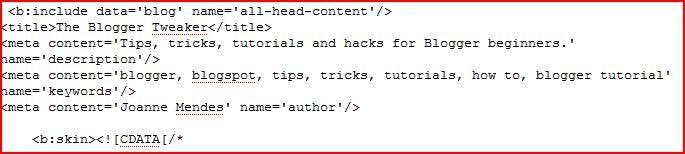
Here's what mine looks like:
Now it's time to make sure that your meta tags are properly phrased and working. There are free meta tag analyzers that will visit your site and give you a report on how your tags are working and suggest improvements. I use the SEOCentro Meta Tag Analyzer because you get back a very thorough report in seconds that lets you know what's working, what's not working and why. And its free, and free is always good.


 Posts
Posts

